
Select Your Markets
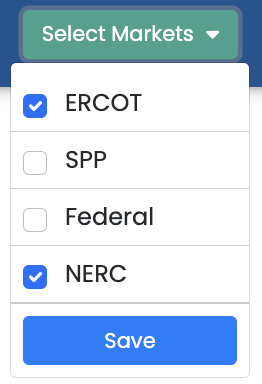
Use Select Markets to control which available markets and venues appear throughout your Grid Monitor workspace. This keeps meetings, summaries, search results, and other content focused on the coverage relevant to your role.

Change Your Market Selection
- Select Select Markets from the top navigation.
- Choose the markets or venues you want included in your workspace.
- Apply or save the selection.
- Return to the Dashboard or another workspace and confirm that the displayed content reflects your choices.
What Changes When You Select a Market
Your market selection can affect which meetings, meeting summaries, regulatory items, search results, and other market-specific content are shown. The exact options available depend on the coverage included with your account.
TIP: If a market or venue you expect to see is missing from Select Markets, your account may not include that coverage. Contact your Grid Monitor account representative or use Feedback/Help if you believe access should be enabled.
Last updated: 9/16/26, 7:34 PM